Waitlist
When a performance sells out, buyers can join its waitlist from your ticket page. This works for general admission and for reserved seating. Whenever tickets free up, the next person in line is emailed an offer and has 30 minutes to buy before it moves on to the next person.
Where to find it: Waitlist tab
Who can use this: anyone with Manage Ticketing (Studio)
Reserved seating
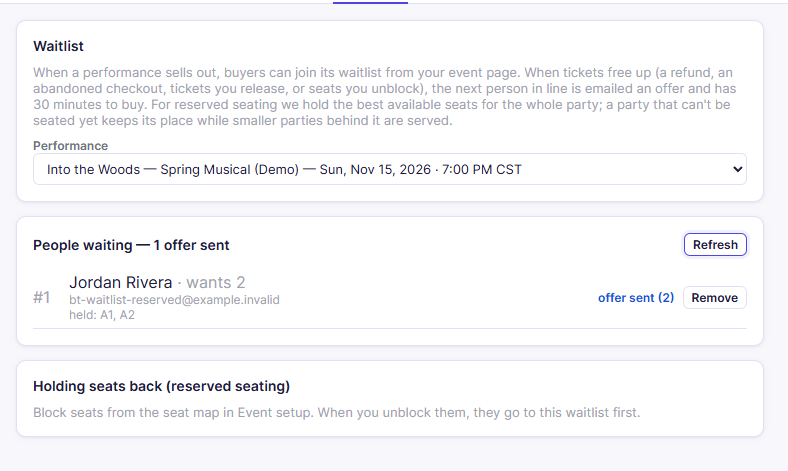
For a reserved-seat performance, buyers join from the seat map when there aren't enough open seats for their party. They say how many seats they need and, optionally, which seats: Best available, Wheelchair-accessible seating, or one price level (for example Premium seats only).
When seats free up, the best available seats for the whole party are held for the next person in line (seats together in one row, nearest the front, when possible). The offer email lists the seat numbers. If the first person's party can't be seated yet, for example they need 4 seats together and only 2 are open, they keep their place, and a smaller party behind them is offered the seats.
How tickets free up
Offers go out automatically, in the order people joined, when:
- you refund an order for that performance,
- a buyer releases seats they were holding, abandons checkout, or lets their hold expire,
- a waitlister declines or lets an offer expire,
- you release held-back tickets to the waitlist (general admission, see below), or
- you unblock seats on the seat map (reserved seating).
Watch the list
- Pick the Performance.
- People waiting lists each person in order: their place (#1, #2…), name, email, how many tickets they want, any seat preference, the seats held for them (reserved seating), and their status:
| Status | Meaning |
|---|---|
| waiting | In line |
| offer sent | Emailed an offer. The number shows how many tickets are held for them |
| bought | Completed the purchase |
| offer expired | Didn't buy within 30 minutes. The tickets moved on |
| declined | Said "no thanks". The tickets moved on |
| removed | Taken off the list |
- Offer sends someone an offer right away, if tickets are available.
- Remove takes them off the list. If they had an offer, it moves to the next person.
Hold tickets back
Reserved seating: block seats from the seat map in Event setup instead. When you unblock them, they're offered to the waitlist first.
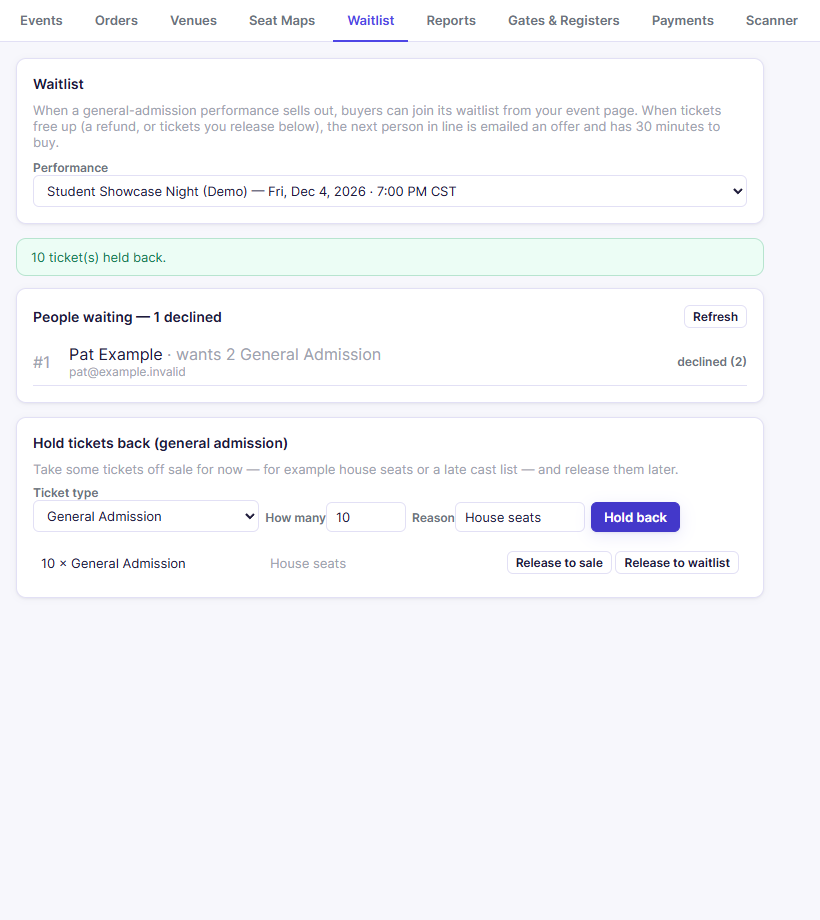
General admission: take some tickets off sale for now, for example house seats or a late cast list, and release them later.
- Choose the Ticket type, How many, and a Reason.
- Click Hold back. The show sells as if those tickets don't exist.
- When you're ready, click one of these next to the hold:
- Release to sale: anyone can buy them.
- Release to waitlist: they're offered to the waitlist in order first.
Tip: Holding back your remaining tickets is also a way to "sell out" early and start a waitlist.
Related
- Orders: refunds free up tickets for the waitlist
- Buying tickets: what buyers see