Cash drawer and will-call
Where to find it: Box Office tab → Cash drawer panel (below the door sale)
Who can use this: anyone with Run Box Office (or Manage Ticketing)
Start of the night
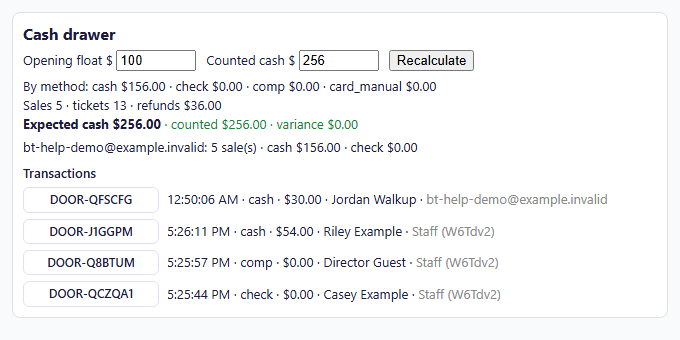
Enter the cash you start with in Opening float $, for example 100.
During the night
The drawer shows running totals for the selected performance:
- By method: totals for cash, check, comp, card_manual, and card reader.
- Sales / tickets / refunds: how many sales, how many tickets, and any refunds made from the Orders view. When add-ons or donations are sold, a line also shows Add-ons and donations totals.
- Expected cash: the opening float plus cash sales.
- Per staff member: how many sales each person made, with their cash, check, and card reader totals.
- Transactions: every sale, newest first, with a clickable confirmation-code button, time, method, net amount, buyer name, and who sold it. Click any confirmation code to open that order in the Box Office Orders view (to reprint tickets, email tickets, or issue a refund). Long lists scroll inside the panel.
End of the night: count the drawer
- Count the cash in the drawer.
- Enter it in Counted cash $.
- Click Recalculate.
The drawer shows counted and variance next to Expected cash. The variance is green when it's $0.00 and red when the count is over or short.
Tip: Checks aren't part of expected cash. Count them separately against the check total under By method.
Will-call
Will-call marks an order as "picking up at the door." Marked orders appear in the Will-call list on the Check-in desk.
To mark an order, type its confirmation code (for example DOOR-QFY7L7) in the box at
the bottom of the Box Office and click Mark will-call. Clear removes it. You can
also do this from the Orders tab.
When the buyer arrives, find them on the Check-in desk, then Print Ticket or Check in.