Box Office
The Box Office tab is your ticket window. Sell reserved seats or general admission to walk-up buyers, take payment any way you like, and reconcile the cash drawer at the end of the night. It works on a phone, tablet, or laptop.
Where to find it: Box Office tab
Who can use this: anyone with Run Box Office (or Manage Ticketing)
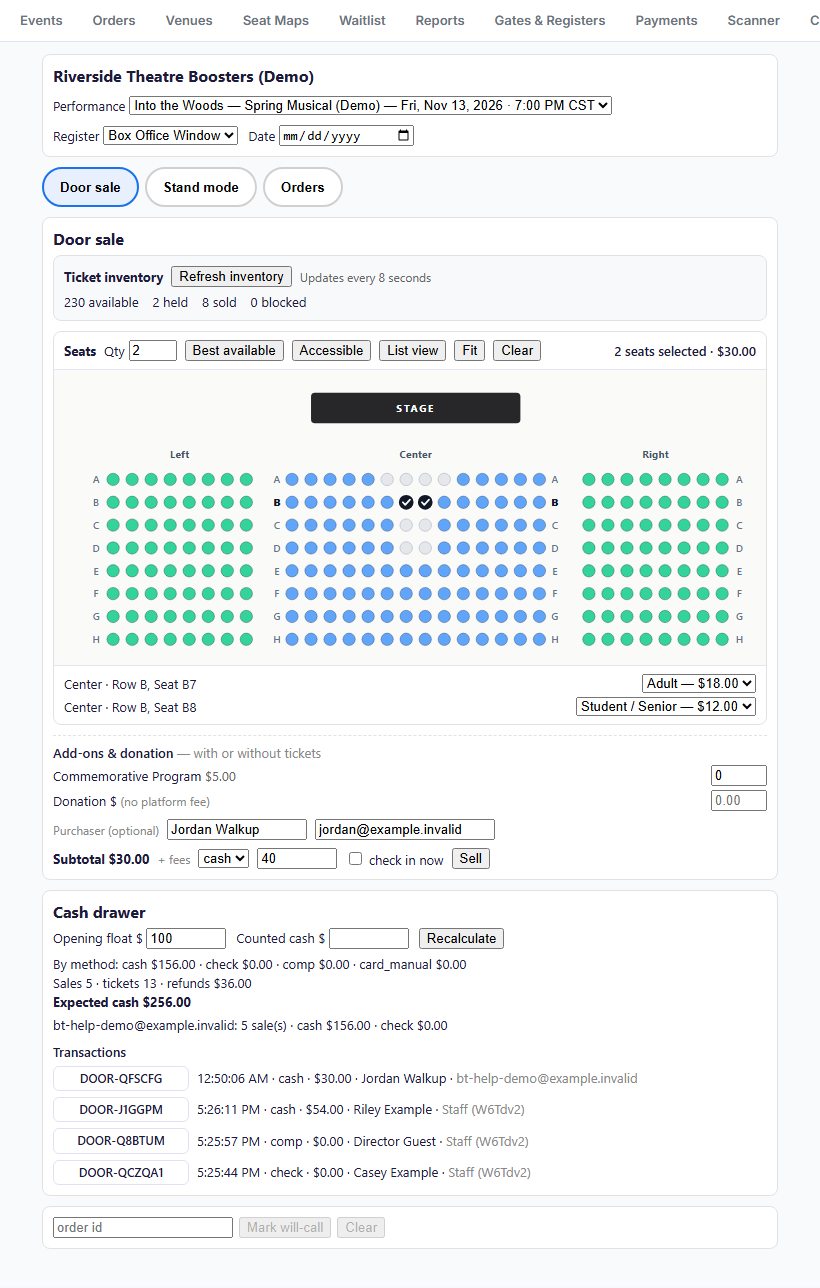
The screen, top to bottom
| Area | What it's for | Help |
|---|---|---|
| Performance, Register, Date | Which performance you're selling, and which register you are | Selling at the door |
| Door sale / Stand mode / Orders | Switch between full ticket + add-on sales, fast concession/merch card-reader tiles, and order lookup/refunds | Selling at the door |
| Ticket inventory | Live availability per ticket type (GA) or seat state counts (reserved), refreshed every 8 seconds | Selling at the door |
| Door sale | Pick seats or quantities, add concessions/merch or a donation, choose payment, and Sell | Selling at the door |
| Last sale | Confirmation code, change due, Print Receipt, Print Ticket | Selling at the door |
| Cash drawer | Opening float, counted cash, expected cash, and clickable transaction buttons | Cash drawer and will-call |
| Will-call | Mark orders for pickup at the door | Cash drawer and will-call |
To look up, reprint, email, or refund an order right from the Box Office, switch to the Orders view at the top of the Box Office (or click any confirmation code in the cash drawer's Transactions list). Refunds automatically update the drawer totals.
Box office sales don't need Stripe or Square. Cash, check, comp, and manually-run card sales are recorded at the drawer and work whether or not you've connected a payment provider.
In this section
Related
- Check-in desk: look up and admit ticket holders
- Blocking and holding seats: seats held back for VIPs