Create your account
Sign up your booster club, PTA, or community group for a ticketing-only account. It takes a couple of minutes and creates both your organization and your own admin login.
Where to find it: the Ticketing by BoosterConsensus home page → Get started free →
Who can use this: an adult (18 or older) who is authorized to act for the organization. At a K–12 school, this can't be a student.
What you'll need
- Your organization's name.
- Your school's name. If the school isn't already listed, you'll also need its street address, city, state, ZIP, and phone number.
- An email address you check regularly. This becomes your sign-in, and you'll need to verify it before you can connect a payment provider.
Sign up
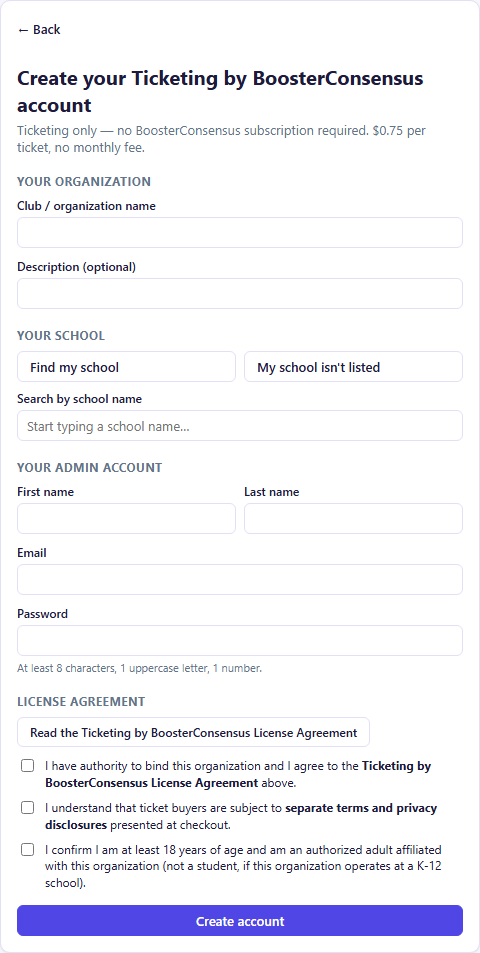
- On the home page, click Get started free →.
- Under Your organization, enter the Club / organization name. You can also add a short Description.
- Under Your school, choose one of these:
- Find my school: start typing the school's name in Search by school name, then click your school in the list. The search matches the beginning of the name, so type the first word or two.
- My school isn't listed: enter the school's name, street address, city, state, ZIP, and phone.
- Under Your admin account, enter your First name, Last name, Email, and a Password.
- Under License agreement, click Read the Ticketing by BoosterConsensus License Agreement to review it, then tick all three boxes.
- Click Create account.
When it works, you're taken to the sign-in screen with your email already filled in and the message "Account created — sign in with the password you just set." You'll also get a welcome email with a link to verify your email address. Click it before you try to connect Stripe or Square.
Note: Pricing for ticketing-only accounts (and BoosterConsensus Core) is 1% of the ticket price plus $0.75 per ticket sold, with no monthly or annual fee. Paid BoosterConsensus Plus and Complete plans pay 1% plus $0.50 per ticket. Donations carry no platform fee, and you pay nothing when you don't sell.
Field reference
| Field | Required? | Notes |
|---|---|---|
| Club / organization name | Yes | Buyers see this name on your public ticket pages |
| Description | No | Short description of your group |
| School | Yes | Pick an existing school, or enter all six school fields |
| First / Last name | Yes | Name on the admin account |
| Yes | Your sign-in; must be verified before you connect payments | |
| Password | Yes | At least 8 characters, including 1 uppercase letter and 1 number |
| License checkboxes | Yes | All three must be ticked |
Common questions
Do we need a BoosterConsensus subscription? No. This is a ticketing-only account. If you want dues, committees, volunteers, and accounting later, you can upgrade to full BoosterConsensus yourself, without changing your login.
Can I add more admins or volunteers later? Yes. See Adding staff and permissions.
Troubleshooting
| If you see... | It means... | Do this |
|---|---|---|
| "Club/organization name is required." | The name field is blank | Enter your organization's name |
| "Search for and select your school…" | You typed a school name but didn't click a result | Click your school in the results list, or switch to My school isn't listed |
| "All school fields are required." | A field is missing under My school isn't listed | Fill in all six school fields |
| "Please review and accept the License Agreement…" | At least one of the three boxes is unticked | Tick all three boxes |
| "An account with this email already exists. Please sign in instead." | That email already has a Ticketing by BoosterConsensus or BoosterConsensus login | Sign in with it, or use Forgot password? |
| "Please complete the anti-bot challenge and try again." | Our spam protection couldn't confirm you're a person | Turn off any VPN or privacy extension, or try another browser, then submit again |
| "Could not create your account. Please try again." | Something went wrong on our side. Nothing was saved | Wait a minute and submit again. If it keeps happening, email info@boosterconsensus.com |
Related
- Signing in: what to do right after sign-up
- Payments: connect Stripe or Square